Update, 26 October 2026: after this test we rebuilt our AI Budget Forecaster. It now asks whether your growth rate is per month or per year and whether expenses grow with sales, calculates every figure in code, shows a month-by-month table, and uses AI only for the commentary. The test below describes the earlier version.
AI financial forecasting tools take a few inputs, such as monthly revenue, costs and a growth rate, and return a projection for the months ahead, often as optimistic, realistic and pessimistic scenarios. They are quick and the output looks finished. The catch is that a forecast is only as good as its assumptions, and an AI tool will happily make assumptions for you, and the numbers it shows won't tell you what they were.
We tested our own free forecasting tool with a simple 12-month scenario and rebuilt every figure by hand. The arithmetic was fine. What changed the answer by more than $23,000 was a single assumption the tool made on its own. Below is how these tools work, what the test showed, and a checklist for reading any AI forecast.
What "AI financial forecasting" actually means
The phrase covers two quite different kinds of software, and it helps to know which one you're using.
Statistical and machine-learning forecasting. This is what finance teams in larger companies use. The software looks at months or years of your actual history (sales by week, seasonality, payment timing, sometimes outside data such as prices or weather) and fits a model that projects the pattern forward. It needs a lot of clean historical data, and its strength is spotting patterns a person would miss.
Language-model forecasting. This is what most free "AI forecaster" tools do, including ours. You give a handful of numbers, the tool sends them to a large language model with instructions, and the model writes back a forecast. It has no history to learn from. It is reasoning from your inputs plus general knowledge of how businesses behave, which makes it closer to asking a well-read colleague for a back-of-envelope projection than to running a forecasting model.
Both are useful. They just answer different questions. The first estimates what your data says will happen. The second helps you think through what might happen under a few stated assumptions, and it is only as reliable as those assumptions.
A real test: 12 months for a small business
We used the Finaiver AI Budget Forecaster with these inputs:
- Monthly revenue: 20,000
- Monthly expenses: 16,500
- Growth rate: 2%
- Forecast period: 12 months
- Industry context: General
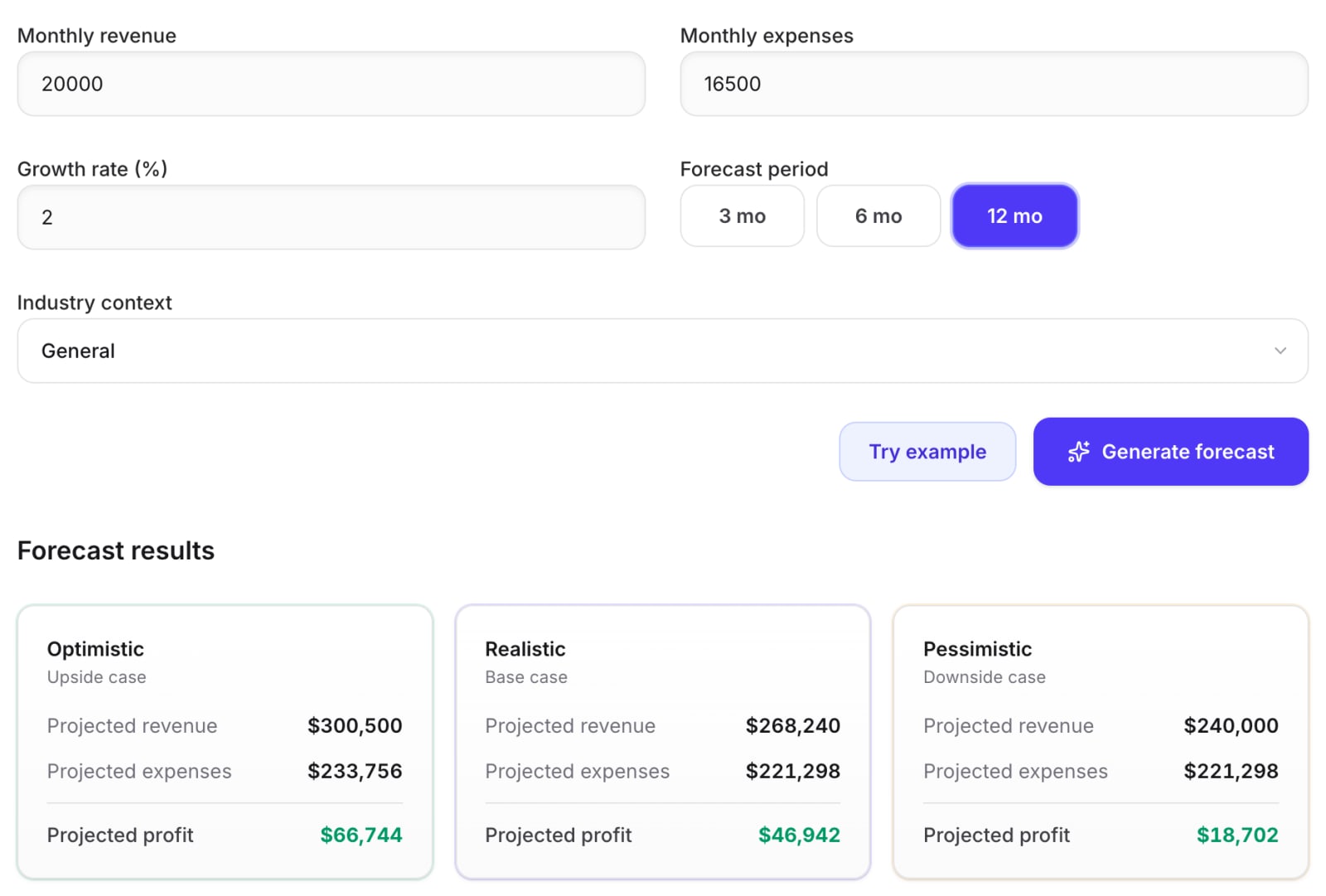
The tool returned three scenarios, each as a 12-month total:
| Scenario | Revenue | Expenses | Profit | Margin |
|---|---|---|---|---|
| Optimistic | 300,500 | 233,756 | 66,744 | 22.2% |
| Realistic | 268,240 | 221,298 | 46,942 | 17.5% |
| Pessimistic | 240,000 | 221,298 | 18,702 | 7.8% |
Step 1: work out your own reference points first
Before reading any AI forecast, do two or three quick calculations yourself so you have something to compare against. For these inputs:
No growth at all. 12 × 20,000 = 240,000 revenue, 12 × 16,500 = 198,000 expenses, so profit is 42,000 (a 17.5% margin).
2% a month, revenue only. If revenue grows 2% every month starting from 20,000 in month one, the 12-month total is:
20,000 × (1.02¹² − 1) ÷ 0.02 = 268,242
By month 12, revenue would be about 24,867 a month. With expenses flat at 16,500, profit would be 268,242 − 198,000 = 70,242.
2% a year. If the 2% was meant as an annual rate, monthly growth is only about 0.165%, and 12-month revenue comes to about 242,192. With flat expenses, profit is about 44,192.
That's a wide spread from one ambiguous input: profit anywhere from roughly 42,000 to 70,000 depending on what "2%" means and what happens to costs.
Step 2: reverse-engineer what the tool assumed
Now compare the tool's numbers with those reference points.
Realistic case. Revenue of 268,240 matches the "2% a month" reading to within 2 (the gap is rounding). So the tool treated the growth rate as monthly, which works out to about 26.8% a year (1.02¹² − 1). That's a big assumption for a business that typed "2%".
Expenses of 221,298 are not flat. They match 16,500 growing at exactly 2% a month (16,500 × (1.02¹² − 1) ÷ 0.02 = 221,299). So the tool also assumed costs grow at the same rate as revenue. That's why the margin stays at exactly 17.5%, the same as today. The "realistic" case is the current business scaled up, nothing more.
Optimistic case. Revenue of 300,500 implies growth of about 4% a month. Expenses of 233,756 imply about 3% a month. Costs grow more slowly than sales, so the margin widens to 22.2%.
Pessimistic case. Revenue of 240,000 is exactly zero growth, but expenses are the same 221,298 as the realistic case, still rising 2% a month. Flat sales with costs rising 2% every month (about 27% a year) is a harsh stress test. It's not impossible (think of a business hit by rising rent and wages at the same time) but it is severe, and you should decide for yourself whether it's a realistic downside.
What the test tells you
The arithmetic in every card was correct. Each profit equals revenue minus expenses, and each total matches a clean growth formula. That's better than we found when we tested AI on financial analysis, where the tool slipped on its own arithmetic.
The weak point was assumptions, and two of them did almost all the work:
| Assumption | What the tool chose | If you meant the other option |
|---|---|---|
| Is "2%" monthly or yearly? | Monthly (about 26.8% a year) | 2% a year gives revenue of about 242,192, not 268,240 |
| Do costs grow with sales? | Yes, at the same 2% a month | Flat costs give profit of 70,242, not 46,942 |
A $23,300 difference in profit came from one line nobody typed. Neither assumption is unreasonable. Some businesses do grow 2% a month, and many costs do rise with sales. The problem is that the scenario cards show totals, not assumptions, so you only find them by doing the reverse-engineering above.
Why AI forecasts look more certain than they are
Three things make language-model forecasts easy to over-trust.
Precise numbers. "Projected profit 46,942" reads like a calculation from your data. It's a calculation from the model's chosen assumptions. Precision to the dollar says nothing about whether the assumptions are right.
Three neat scenarios. Optimistic, realistic and pessimistic sound like a full range. In our test, all three were built from growth rates the tool picked, and none used the reading of "2%" as a yearly rate. Your real outcome could sit outside all three.
No history. Without months of real data, the tool can't know your seasonality, your biggest customer, or that December is always slow. A forecast from four inputs is a sketch, however professional it looks.
How to check any AI forecast: a checklist
1. Do a no-growth baseline yourself
Multiply monthly revenue and costs by the number of months. It takes ten seconds and tells you how much of the forecast depends on growth.
2. Say exactly what your growth rate means
Write "2% per month" or "2% per year", never just "2%". If a tool only has a bare number field, check which reading it used by comparing its revenue with the formula above.
3. Find out what happened to costs
Divide the forecast's expenses by the number of months and compare with what you entered. If they're higher, the tool grew your costs. Decide whether that's right for your business: rent and software usually stay flat; materials, shipping and commissions usually rise with sales.
4. Check the margin
If the realistic margin equals your current margin, the tool probably scaled everything up together. If it changes, find out why before you rely on it.
5. Recompute each profit
Revenue minus expenses for every scenario. It's the easiest check there is, and if it fails, stop trusting the rest.
6. Ask what would have to be true
For the optimistic case in our test, revenue has to grow about 4% every month for a year. Ask yourself whether you have the customers, stock and time to make that happen. If you can't name what would drive it, treat it as a number, not a plan.
7. Turn the totals into months
A 12-month total hides the shape. A business can be profitable over the year and still run out of cash in month three. For anything you'll act on, build a month-by-month version, like the one in our cash-flow forecasting guide for freelancers, which works for small businesses too.
8. Update it with real results
A forecast is most useful when you compare it with what actually happened. After each month, put in the real figures and see which assumption was off.
When an AI forecast is worth using
Used with those checks, a quick AI forecast is a good fit for:
- A first sense of range before building a proper budget.
- Testing "what if" questions: what if growth is half what I hope, or costs rise faster than sales?
- Starting a conversation with a business partner, adviser or lender about which assumptions matter.
It's a poor fit for anything that needs real accuracy: cash planning for payroll, a loan application, or investor figures. For those you need a month-by-month model built on your actual history, and every assumption written down.
Next step
Try the AI Budget Forecaster with your own figures. Before you look at the result, write down your no-growth baseline and what you mean by your growth rate. Then use the checklist above to find out what the tool assumed for you.
If your forecast feeds into borrowing, our explainer on cash-flow underwriting shows how lenders read the same kind of numbers.
This article is general information, not financial advice.