AI finance solvers are good at classic textbook questions. In our test, an AI got the final answer to five standard finance problems right or very close every time. But when we asked it to show its working, three of the five solutions contained wrong intermediate numbers, and in one case those errors pushed the final answer off by $11.
That matters if you're a student copying the working into an assignment, or anyone using AI to check a loan or investment. Below are the five questions, what the AI said, the correct answers, and quick ways to check any finance answer yourself in a spreadsheet or calculator.
How we ran the test
We asked five questions of the kind you'd find in an introductory finance course or a real borrowing decision. We used gpt-oss-120b, the open-weight model that powers Finaiver's own AI tools, in October 2026. Each question was asked twice:
- Quick: "Answer with the final number only, no working."
- Worked: "Show your working, then give the final answer."
We then calculated every answer independently and checked the loan and savings questions against our own calculators. This is one model on one day. Other AI tools, or the same one on another run, can give different results, which is part of the point.
The results at a glance
| Question | Correct answer | AI quick answer | AI worked answer | Verdict |
|---|---|---|---|---|
| Car loan payment | 505.71 | 506 | 505.80 | Close; cents wrong in working |
| Savings after 10 years | 49,163.80 | 49,160 | 49,163.76 | Close |
| NPV at 8% | 4,017.99 | 4,020 | 4,029.46 | Worked answer wrong |
| IRR | 11.62% | 11.62% | 11.62% | Right, but working had errors |
| Effective annual rate | 19.56% | 19.56% | about 19.6% | Right |
Now the detail, question by question.
Question 1: monthly payment on a car loan
The question: A $25,000 car loan has an APR of 7.9% and a term of 60 months, with fixed monthly payments. What is the monthly payment?
The formula: payment = P × r ÷ (1 − (1 + r)⁻ⁿ), where P is the loan, r is the monthly rate and n is the number of payments.
Correct answer: r = 0.079 ÷ 12 = 0.0065833. Then (1 + r)⁻⁶⁰ = 0.674553, so the payment is 164.5833 ÷ 0.325447 = 505.71. Over 60 months you pay 30,342.85, which is 5,342.85 in interest.
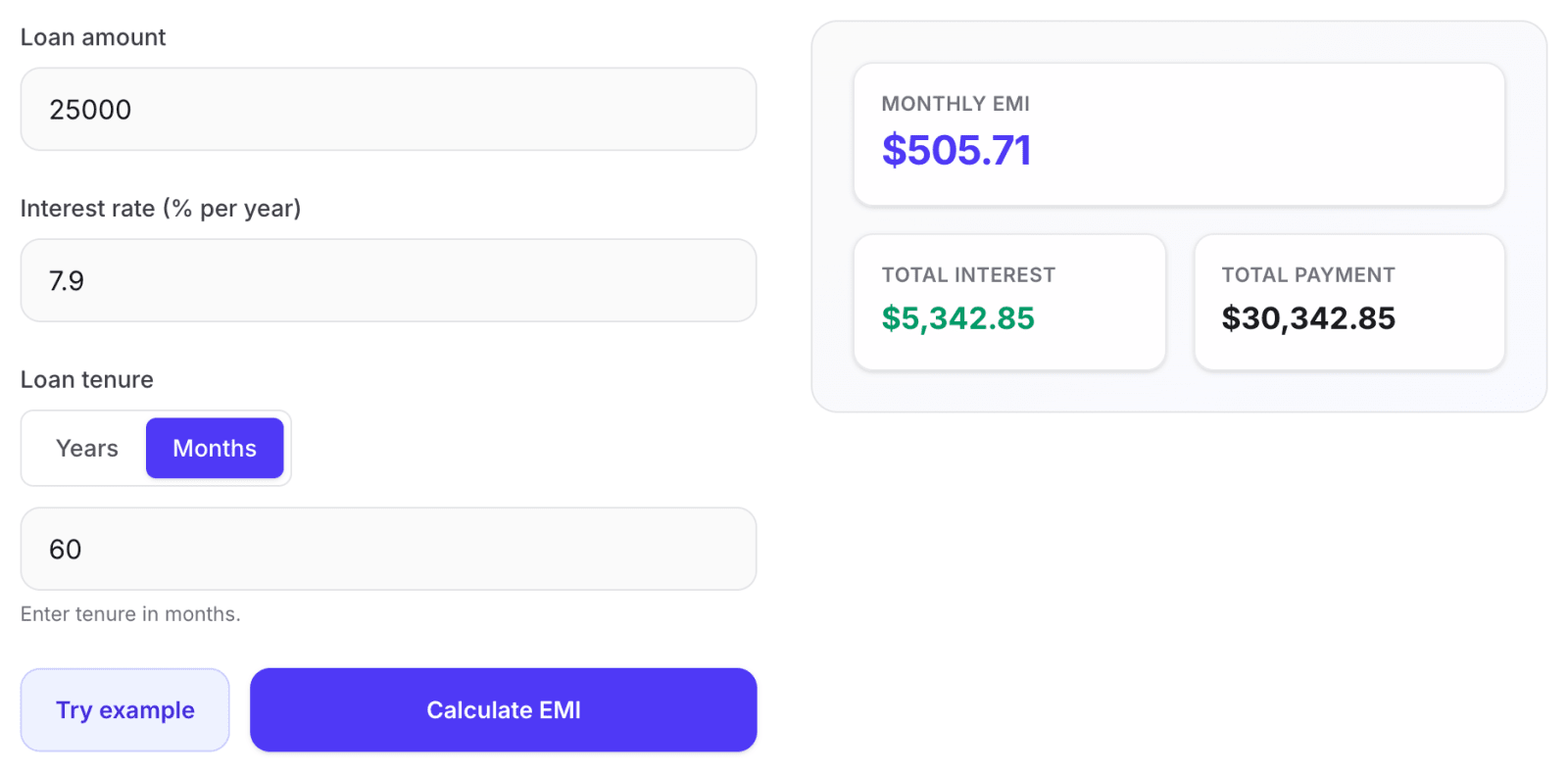
What the AI did: The quick answer was $506, which is fine to the nearest dollar. The worked answer used the right formula but rounded (1 + r)⁻⁶⁰ to 0.6746 partway through, then stated the payment "with cents" as $505.80. It's only 9 cents a month, but the AI presented a precise figure that its own rounding had made inaccurate.
The lesson: Rounding in the middle of a calculation is one of the most common sources of small errors, from people and AI alike. Keep full precision until the last step.
Question 2: how much a monthly saving grows
The question: You save $300 at the end of every month for 10 years in an account paying 6% a year, compounded monthly. How much do you have at the end?
The formula: future value = PMT × ((1 + r)ⁿ − 1) ÷ r, with r = 0.005 a month and n = 120 months.
Correct answer: (1.005)¹²⁰ = 1.819397, so the future value is 300 × 163.8793 = 49,163.80. You deposited 36,000, so 13,163.80 is interest.
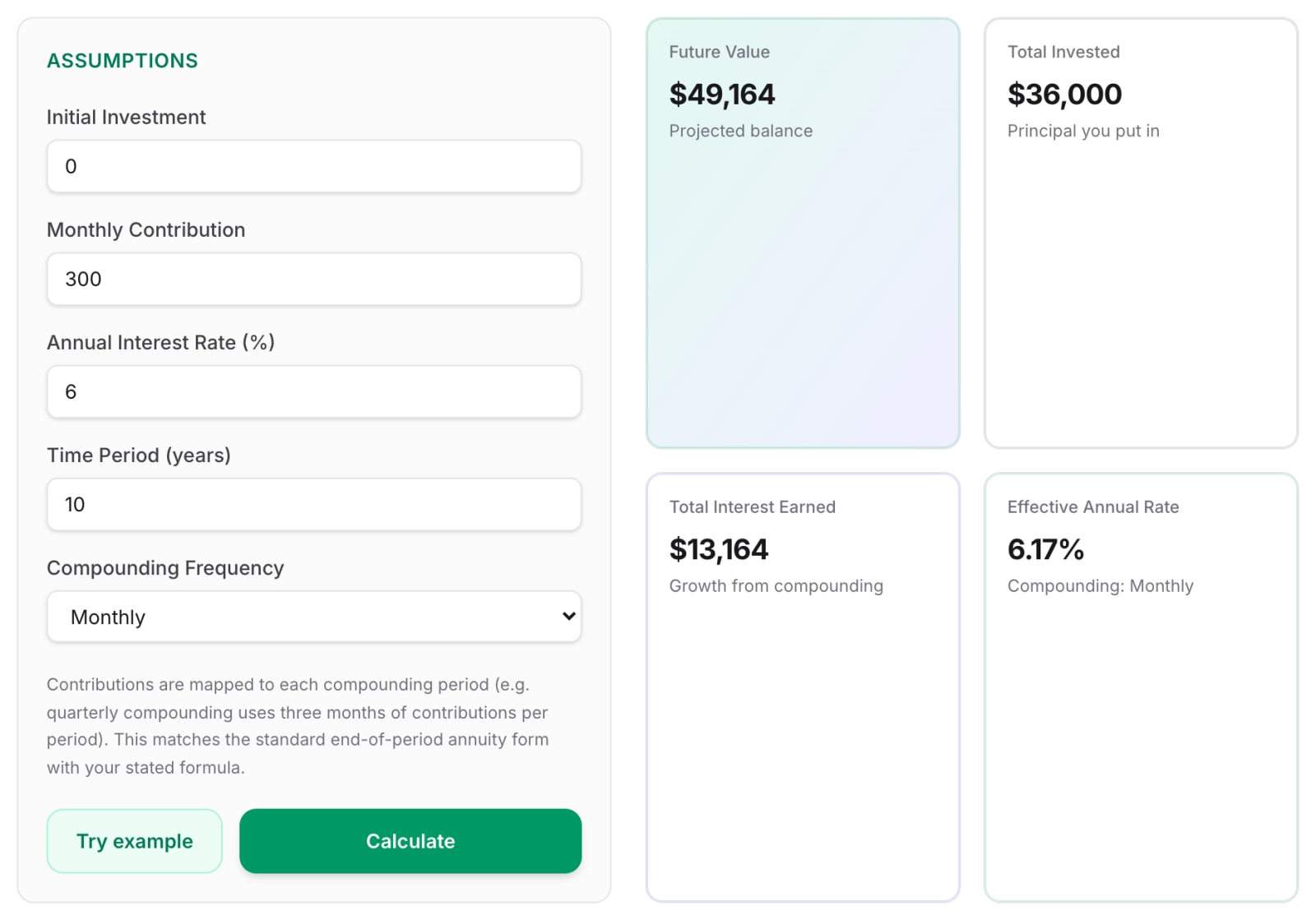
What the AI did: Quick answer 49,160, worked answer 49,163.76. Both are close. The 4-cent gap in the worked answer came from rounding again.
A trap to watch for: the words "at the end of every month" matter. If you save at the start of each month (an "annuity due"), every deposit earns one extra month of interest and the answer becomes 49,409.62, about 246 more. Many real savings plans pay in at the start of the month. If your question doesn't say which, an AI will pick one, usually without mentioning it. For more on how this works, see compound interest explained with examples.
Question 3: net present value (NPV)
The question: A project costs $50,000 today and returns $15,000, $18,000, $20,000 and $12,000 at the end of years 1 to 4. What is its NPV at a discount rate of 8%?
Correct answer: discount each cash flow by 1.08 raised to its year, then subtract the cost.
| Year | Cash flow | Discount factor | Present value |
|---|---|---|---|
| 1 | 15,000 | 1.08 | 13,888.89 |
| 2 | 18,000 | 1.1664 | 15,432.10 |
| 3 | 20,000 | 1.259712 | 15,876.64 |
| 4 | 12,000 | 1.360489 | 8,820.36 |
| Total | 54,017.99 |
NPV = 54,017.99 − 50,000 = 4,017.99.
What the AI did: The quick answer of 4,020 was close. The worked answer was not. The AI wrote down the correct discount factors and then divided wrongly in three of the four rows:
| Year | AI's present value | Correct | Error |
|---|---|---|---|
| 2 | 15,436.51 | 15,432.10 | +4.41 |
| 3 | 15,878.46 | 15,876.64 | +1.82 |
| 4 | 8,825.60 | 8,820.36 | +5.24 |
Those slips added up to a final NPV of 4,029.46, about $11 too high. Here, the version with full working was less accurate than the one-line answer. And because each step looks plausible, you wouldn't spot it without redoing the divisions.
Question 4: internal rate of return (IRR)
The question: The same project: what is its IRR?
Correct answer: IRR is the discount rate that makes NPV exactly zero. There's no simple formula, so you search for it. At 10% the NPV is +1,734.85; at 12% it's −395.83. Narrowing in gives 11.62%.
What the AI did: Both answers said 11.62%, which is right. But the working contained wrong numbers along the way. For example, it said the NPV at 11.6% was about +52. The real figure is +18.77, and its present values at that rate were off by up to 15 each (it gave 14,404 for year 3, which should be 14,389.23). The final answer still came out right because an NPV error of a few dozen dollars barely moves the rate where NPV hits zero, here by about 0.03 percentage points.
The lesson: A correct final answer doesn't mean correct working. If you're submitting working for marks, or explaining a decision to someone else, check the steps, not just the result.
Question 5: APR vs effective annual rate
The question: A credit card charges 18% APR, compounded monthly. What is the effective annual rate?
Correct answer: (1 + 0.18 ÷ 12)¹² − 1 = 1.015¹² − 1 = 19.56%.
What the AI did: Right both times (19.56% and "about 19.6%"). Short, single-formula questions like this were the most reliable in our test. Our guide to APR vs interest rate explains why the two numbers differ.
What the test shows about finance AI solvers
Final answers to standard questions are usually close. All five quick answers were within a few dollars, or exactly right.
Working is where the errors hide. Three of the five worked solutions had wrong intermediate numbers, presented with the same confidence as the correct ones. A language model writes each line of a calculation as text. It doesn't run a calculator unless the tool is built to do that, so digits can drift.
Longer calculations are riskier. The single-formula questions (loan payment, effective rate) held up well. NPV and IRR, with several divisions each, are where the mistakes appeared.
Ambiguous wording gets silently resolved. Start or end of month, APR or effective rate, monthly or yearly growth: if the question doesn't say, the AI picks one. We saw the same thing when we tested AI financial forecasting, where a bare "2%" was read as monthly growth.
How to check any finance answer in 2 minutes
You don't need to redo the whole calculation. A spreadsheet function will give you the exact answer to compare against. These work in both Excel and Google Sheets:
| What you need | Formula to type | Result for our questions |
|---|---|---|
| Loan payment | =PMT(7.9%/12, 60, -25000) | 505.71 |
| Future value of savings | =FV(6%/12, 120, -300) | 49,163.80 |
| Same, saving at start of month | =FV(6%/12, 120, -300, 0, 1) | 49,409.62 |
| NPV | =NPV(8%, 15000, 18000, 20000, 12000) - 50000 | 4,017.99 |
| IRR | =IRR({-50000, 15000, 18000, 20000, 12000}) | 11.62% |
| Effective annual rate | =EFFECT(18%, 12) | 19.56% |
The NPV trap. Spreadsheet NPV assumes the first cash flow comes one period from now. If you put the −50,000 inside the function, it gets discounted by a year too, and you get 3,720.36 instead of 4,017.99. Keep today's cost outside the NPV function and subtract it, as in the table. This catches out people and AI tools alike.
For loans and savings, you can also use a calculator built for the job. Our Loan EMI Calculator and Compound Interest Calculator matched the figures above. Our Finance Solver handles all five question types in one place and shows the working with your own numbers.
How to get better answers from an AI solver
- State every convention. Write "payments at the end of each month", "6% a year compounded monthly" or "2% growth per month" rather than leaving it to the AI.
- Ask for the final answer and the formula, then check it yourself. One spreadsheet formula is faster than reading three paragraphs of working.
- Ask it to keep full precision. "Don't round until the final answer" reduces the cents-level drift we saw.
- Be suspicious of long working. The more steps, the more chances for a slip. Check the steps that carry the most weight.
- Use AI to learn, not to submit. Seeing how a problem is set up is useful. Copying working you haven't checked is how wrong numbers end up in assignments and decisions.
Next step
Pick one finance question you're working on, ask an AI tool for the answer, then check it with the matching spreadsheet formula above. If you're comparing loans, run the numbers through the Loan EMI Calculator, and see how loan EMI is calculated for the full method.
This article is general information, not financial advice.