Open banking is a way for you to let another company, such as a budgeting app or a lender, read your bank account data or start a payment from your account, with your explicit permission. The app never sees your banking password. Instead, your bank checks who you are, asks what you agree to share, and gives the app a limited, revocable key.
The rest of this guide covers how the pieces fit together, what can go wrong, and how to switch access off.
The problem open banking was built to solve
Before open banking, if an app wanted to see your transactions, the common method was "screen scraping". You typed your online banking username and password into the app, and the app logged in as you, read the pages, and copied the numbers.
That worked, but the app held your full credentials, your bank couldn't tell the app apart from you, and the only way to stop sharing was to change your password, which broke every other app at once.
Open banking replaces that with a front door. The bank publishes an interface (an API) that approved apps can call, and you decide, at the bank, what each app may see and for how long.
How open banking works, step by step
Here is what happens when you connect a budgeting app to your current account.
- You start in the app. You tap "connect your bank" and pick your bank from a list.
- You're sent to your bank. The app redirects you to your bank's own website or banking app. This matters: you log in on the bank's page, not the app's.
- The bank authenticates you. Usually with the same login and second factor you'd normally use, such as a fingerprint in the banking app or a one-time code.
- You see a consent screen. It lists what the app is asking for, for example "account balance, transactions for the last 12 months, account holder name", and often how long the access will last.
- You approve or decline. You can usually choose which accounts to include.
- The bank issues a token. The app gets an access token: a long random string that stands for "this app may read these accounts, with these permissions, until this date". No password changes hands.
- The app calls the bank's API with the token. Each request is checked against the permissions you granted. Ask for something outside them and the bank refuses.
If this sounds like "Sign in with Google", that's because many open banking systems use the same OAuth 2.0-style flows: scoped, time-limited access without sharing your password.
Access tokens, refresh tokens and expiry
Access tokens are deliberately short-lived. The app is often also given a refresh token, which it can exchange for a new access token without bothering you, but only while your overall consent is still valid.
Many systems also require you to re-confirm consent periodically. How often depends on the country and the type of access. When that consent lapses, the app has to send you back to the bank to approve again.
Who's involved: banks, apps and aggregators
| Party | What it does | Example |
|---|---|---|
| Account provider | Holds your money and data, runs the API, authenticates you | Your bank or card issuer |
| Third-party provider (TPP) | The app you're actually using | A budgeting app, a lender, an accounting tool |
| Aggregator | A middle layer that connects to many banks and gives apps one integration | A data connectivity company the app contracts with |
| Regulator or scheme | Sets the rules, licenses providers, handles standards | Varies by country |
Aggregators are often invisible. The consent screen may show the aggregator's name alongside, or instead of, the app's. That isn't a red flag in itself; it usually means the app uses that company to reach many banks through one integration. It does mean a second company handles your data, so note who it is.
Data access versus payment initiation
Open banking covers two different powers, and it helps to keep them apart:
- Account information: reading balances, transactions and account details. This is what budgeting apps and lenders mostly use.
- Payment initiation: asking your bank to send a payment from your account, which you approve at the bank. This lets a merchant or app take a bank transfer without card details.
A read-only consent cannot move money. A payment consent normally covers one specific payment, or a defined series, that you approve.
How the rules differ by country
There isn't one global open banking system. Some regions require larger banks by law to offer standardised APIs to licensed third parties. Others leave it to the market, where banks and data companies strike their own agreements and adopt industry standards voluntarily. Some countries extend the same idea to other data, such as energy or telecoms, under broader "open finance" or "consumer data right" style rules.
The differences that matter to you are which banks are covered, how long a consent lasts, and who you complain to. Your national financial regulator's website is the place to check the rules where you live, and most keep a public register of authorised providers.
What people actually use it for
- Budgeting and money-management apps that pull transactions from several banks into one view and sort spending into categories.
- Lending decisions. With your consent, a lender reads your account history to see income and regular outgoings, instead of asking you to upload PDF statements.
- Pay-by-bank checkout, where you pay a merchant by approving a bank transfer in your banking app.
- Account verification, confirming that you own the account you've given for payouts or direct debits.
- Accounting software for small businesses that imports bank feeds automatically.
Worked example: how a lender might read your cash flow
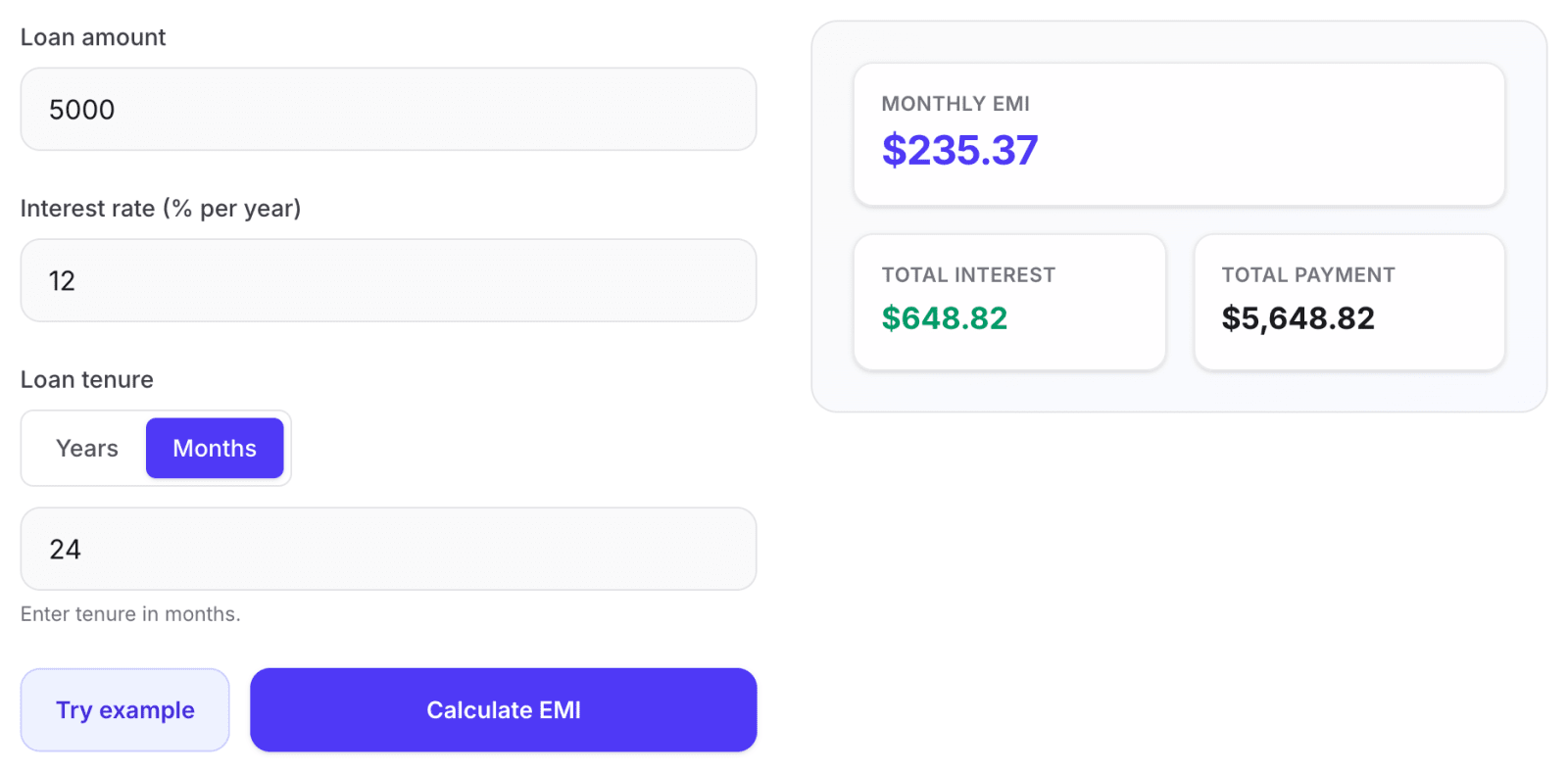
Say you apply for a $5,000 personal loan over 24 months and agree to share three months of transactions. Here's a simplified version of what an underwriter might calculate. All figures are illustrative.
Step 1: average income. Salary deposits were $3,200, $3,350 and $3,050. Average: ($3,200 + $3,350 + $3,050) ÷ 3 = $3,200 a month.
Step 2: committed outgoings. The data shows regular payments for rent ($1,100), a car loan ($250), utilities ($180) and phone plus subscriptions ($65). Total: $1,595, which is about 49.8% of income.
Step 3: the new payment. At an illustrative 12% annual rate, a $5,000 loan over 24 months has a monthly payment of about $235.37.
Step 4: what's left. $3,200 − $1,595 − $235.37 = about $1,369.63 a month for food, transport and everything else. Debt payments alone (car loan plus new loan) would be about $485.37, roughly 15.2% of income.
A lender would compare those numbers with its own affordability rules. The point is that the data came straight from the bank, so there's no retyping and less room for error or fraud. You can read more about how lenders weigh this kind of information in our guide to credit underwriting.
The risks, honestly
Open banking is generally safer than password sharing, but it isn't risk-free.
- You may share more than the app needs. A consent for 12 or 24 months of full transaction history reveals a lot: where you shop, your health spending, who you send money to.
- Data can be stored and reused. Once an app has copied your transactions, revoking access stops new data flowing but doesn't automatically delete what's already held. Check the privacy policy for retention and deletion.
- Lookalike apps and phishing. A fake app can show a convincing "connect your bank" page that is really a password-harvesting form. The real flow sends you to your bank's own site or app.
- Payment scams still work. Payment initiation is secure in the technical sense, but if a fraudster persuades you to approve a transfer, you've still approved it. Read the payee and amount on your bank's screen every time.
- Screen scraping hasn't disappeared everywhere. In some markets and for some accounts, apps may still ask for your banking password. That's a different, riskier model.
How to check and revoke access
You should be able to stop sharing from either end.
- In your banking app or online banking, look for a section with a name like "connected apps", "third-party access" or "open banking". It lists each app, what it can see, and when access expires. Remove anything you don't recognise or no longer use.
- In the app itself, look for "disconnect bank" or "manage connections" in settings.
- Through the aggregator, if one was involved. Several run consumer portals where you can see and cut connections across all apps that use them.
- Ask for deletion. Revoking access stops future reads. To remove stored data, use the app's data-deletion or account-closure option, or contact it directly.
Tidy up every few months, especially apps you tried once and forgot.
Mistakes to avoid
- Typing your bank password into a third-party page. If the login screen isn't your bank's own site or app, stop.
- Approving without reading the consent screen. Check the accounts, the data types and the duration.
- Confusing a read-only connection with a payment approval. If your bank asks you to confirm a payment you didn't expect, decline it.
Is it worth using?
For most people, yes, as long as you can verify the provider and the consent is no broader than the job requires. It's a big step up from handing over your password.
If a lender asks to connect to your account, it helps to know your own numbers first. Run the loan through the Loan EMI Calculator to see the monthly payment and total interest, and read how loan EMI is calculated. If you're curious how payments move once you've approved them, see how card payments work for the card side.
This article is general information, not financial advice.